


Project 3:
Tiny Bunker
The Client:
Introduction to the Project:
For this project the client, Unruly Ember, is looking to venture into 3D game development.
They ask for a unique, imaginative and immersive 3D environment that will impress Unruly Ember.
The target audience are people aged from 12 to 25, and there shouldn't be anything too dark for the younger audience.
Unruly ember explicitely say I should deliver a small 3D environment using originally created assets, and I should import them into Unreal Engine using the template provided.
My Interpretation:
First of all, the brief mentions that the client wants to explore 3D game development, this means I will have to create assets in a 3D modelling software, such as Maya or Blender, I'll use maya as I am more familiar with that software.
As I am making 3D assets I will need to texture them, for this I will use photoshop as it allows me to create advanced textures with it's powerful tools.
In order to think of a "unique, imaginative and immersive" environment, I will have to generate some ideas and create a survey to gather feedback.
The aim of this project is to impress the client, to do this I will have to show an advanced understanding of the tools and functions of my chosen 3D modelling software.
With the target audience being 12 to 25, I will have to make sure that my environment is, at the least, suitable for 12 year olds, whilst also making the environment appealing to, max, 25 year olds.
As I will have to import my assets into Unreal Engine, I will have to choose a suitable version of the engine, I will use version 4.27 as it is more stable than the new version 5 and am more fluent with the UI of version 4.27.
Key Points
-
I will use Maya to create my 3D assets, required for a 3D environment
-
I will use photoshop to create the textures for my 3D models
-
I will think of ideas for the theme of the environment and gather feedback
-
I will use advanced tools and functions to impress the client
-
I should make the game suitable for 12+ but appealing to as much of the age range as I can
-
I will use version 4.27 of Unreal Engine
Idea Generation:
I made a PowerPoint of my idea generation process including, themes, colour palettes, colour theory, possible interaction and 3 proposal mood boards with annotation.


Click on Gallery to Show Images in Full Size
Theme Proposals:
After I spent time coming up with ideas, I made 3 proposals.


Click on Gallery to Show Images in Full Size
Proposal Survey Results:
After I developed my proposals, mentioning colour theory and possible interactables, I made a survey on Microsoft forms to gather feedback from my peers.


Click on Gallery to Show Images in Full Size
-
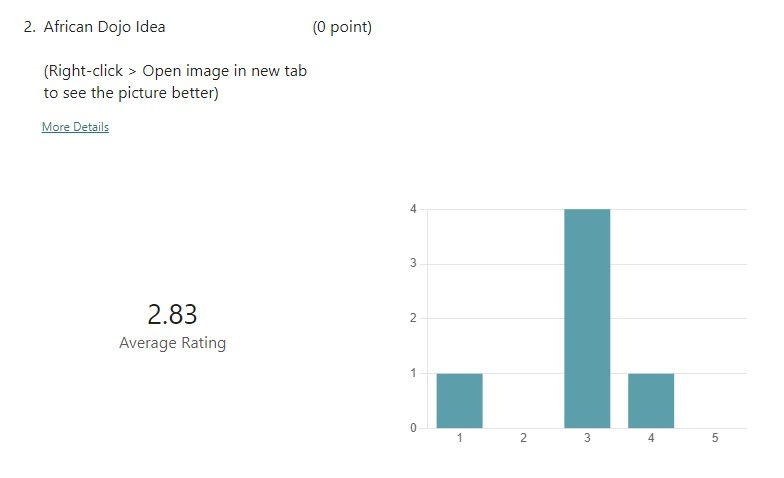
For the first 3 questions I asked the answerers to rate my 3 proposal ideas, this was to see which proposal the target audience appealed to the most, as all my peers who answered are in the target audience range. This provides me with helpful data on which theme I should take further and develop.
-
The 4th question is to see what made them choose their top rated theme, this helps me understand the appeal, and allows me to make sure I implement those things into my final piece.
-
The 5th question was just an optional question in case there was anything else they wanted to mention.
In-depth Result Analysis:
-
From the rating questions, proposal 1 (cyberpunk dojo) was the most popular, so I will be developing on that proposal. It received a rating of 4.83, whereas the African dojo and lodge got ratings of 2.83 and 3.17 respectively.
-
It was rated the most popular due to its bright colour scheme, large room for creativity and it being a unique idea.
-
For the 5th question, I received encouragement to pursue this theme, further proving that the cyberpunk dojo proposal is the most appealing to the target audience.
Key Points:
-
Proposal 1 (Cyberpunk Dojo) was the highest rated proposal
-
Important elements: Bright Colour Scheme, Creative Potential, Unique Idea
Time Management
To manage my time, I am keeping a log of the hours that I work in a time sheet, every week, at the end of the project I will use to send an invoice to the client, which will include the hours I have worked, and the hourly rate I am charging.
As well as this, I will use Trello to set SMART targets for me to keep track of my progress.


Click on Gallery to Show Images in Full Size
Invoicing the Client:
I have done research to the standard hourly rate of 3D artists in the UK, then I determined my hourly rate off of that value. The standard pay is around £30,133, which when made into an hourly rate is around £15/hr. (30,133 / 12 > 2,511 / 4 > 628 / 7 > 90 / 6 > 15)
Rounded Appropriately
So I settled on an hourly rate of £12/hr

End of Week 1:
Review
What Went Well:
Now at the end of the first week, I've completed all of my tasks and I have a clear view of how I want to progress with this project. I have feedback from the target audience which will help me keep the project suitable for them.
What Could've Gone Better:
I would've liked to have put more hours in, but that can be easily done by just doing more work. I should've talked about the art style in my idea generating, as well as this I should've put images of the colour palettes I made into my proposal mood boards. Even though I talk a lot about colour theory in them, I could've put images of the colour palettes to make it clearer.
Start of Week 2:


Click on Gallery to Show Images in Full Size
Asset List:
Limitations & Specifications:
PEGI Regulations:
As the target audience is people aged 12 -25 I will have to follow the PEGI 12 guidelines to make sure that I don't show realistic violence towards human-like characters, and only mild violence to fantasy characters is allowed.
File Types:
For my models, I will export them in the .fbx file type, this is a very popular file type for 3D models, and it is compatible with my game engine of choice.
For my textures, I will always try and use .tga files, these are vector files and hold their resolution really well, unlike JPEGs that lose quality every time they are used.
Any audio will be in the .wav file type as that is what my game engine accepts.
Software:
To make my models I will use Autodesk Maya as I am experienced in this software, I can use blender but I am more comfortable with Maya. Maya also allows me to export my models in the .fbx file type.
To create my textures I will use Adobe Photoshop as it a really well all-around software and I have a lot experience using it, it also allows me to export in the .tga file type.
For my game engine I must use Unreal Engine 4.27.2, this is what I've been using for years and is what the client explicitly wanted.
Dimensions:
As seen in my floor plan, the dimensions of the room are 8.4m x 6m x 3m and the walls are 0.2m thick. All my models I make will have to fit inside a room with these dimensions.
Mood Boards:


Click on Gallery to Show Images in Full Size
Concept Art:

Click on Gallery to Show Images in Full Size
Concept Art Survey & Results:
Reference Images:


Floor Plans:
Firstly, using my asset table as reference, I made my first floor plan which I used for annotations and dimensions:


Then I made my other floorplans, here's all three of them
(In order of 1 - 3):


Floor Plan Survey & Results:
After creating my floorplan drafts, I made a survey to gather feedback on which floor plan is the best.


Q1: Here I asked people to rank my 3 floor plans, Microsoft Forms thinks this has to be a correct or incorrect answer so don't mind any that are highlighted in red. It was really close between 1 and 2, but Floor Plan 2 won, this is the floor plan I will be using.
5 people chose Floor 1
4 people chose Floor 2
1 person chose Floor 3
Q2: In this question I asked why they chose their chosen floor plan, overall, people who chose floor 2 thought it had the most efficient use of space. Mentioning that floor plan 1 was to loaded to the left side of the room.
Those who chose floor plan 1 talked about the tatami mat being in the way of the player's walking path, but the player will be able to walk over it as it is a mat.
Q3: I wanted to ask if my key made clear what would and wouldn't be interactable.
9 people said yes
1 person said some
and none said no, so my key is clear
Q4: I have 12 assets I will be making, not to mention the sounds and textures I'll need, I wanted to ask if these 12 is enough, 80% of people said it was.
Q5: To those who said no, I asked what else they thought I should have, one person mentioned a food container.
Q6: Next I asked if the interactions made sense, 70% said yes, 10% said some do, 20% said no, overall my interaction ideas were clear.
Q7: I then asked those who didn't say yes, what they thought was unclear (I accidentally set this a required question so I got more responses on this question then needed), one person said that I don't specify what each object is, but I do in my annotated version that was available in the survey.
Weeks 3 -7
Production Log:


Click on Gallery to Show Images in Full Size
Week 8
Invoice

Reflection:
Experience:
Throughout this project I had to make models, texture them, make materials and document the process. I definitely felt stressed throughout this experience as there was so much to do, I felt overwhelmed at some points but I also enjoyed some of it.
Reflection:
What Went Well: I was able to decide upon a texturing technique, that being via the rgb channels, and I also made all of my models.
What Went Terribly: I was very burnt out going into this project, my motivation was low and I started way too late.
What I Would Change: I would structure what I worked on at set times differently, I found that if I worked on, for example, texturing, for the whole day, I would quickly get sick of it and become distracted. Next time I will try and mix up my days with different activities for the project to keep myself interested.
Action:
To tackle these negative points, I will:
-
Structure my workflow differently
-
Look into motivation
-
Keep a detailed schedule